AI Is Changing What Users Expect. Product Engineering Must Change With It.
AI makes flexibility possible. Product engineering makes it safe.

For most of the history of enterprise software, product teams decided what users could do. Customers worked within those limits. They chose options, filled in settings, and followed workflows that the vendor designed.
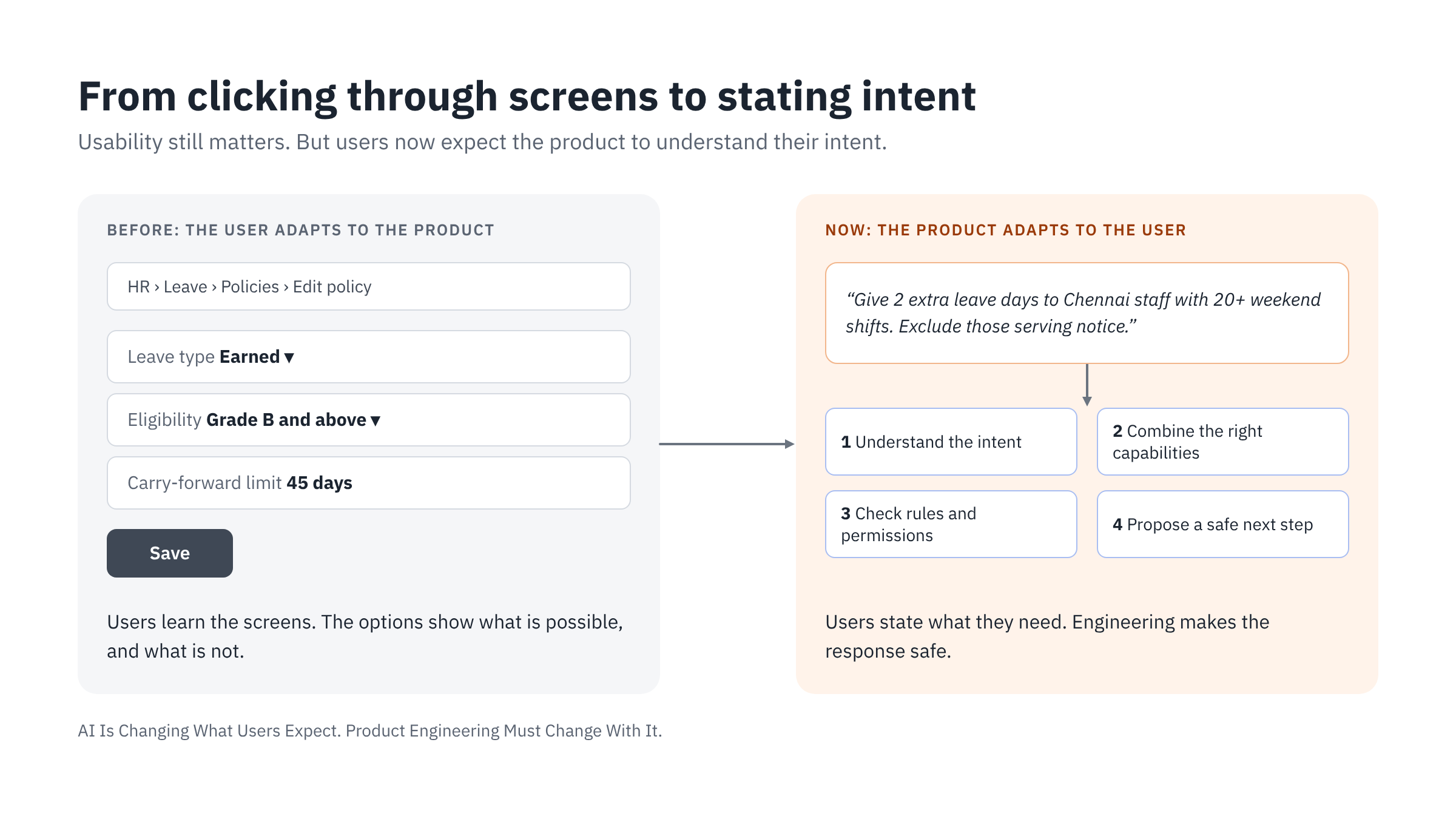
AI is changing this. More and more users want to say what they need in their own words. They expect the product to understand what they mean, combine the right functions, follow business rules, and suggest a safe next step.
This is not mainly a change to the user interface. It changes how enterprise products must be designed and built.
I have spent nearly 30 years in the payments industry, building enterprise products and leading product engineering teams. In product engineering, every good decision starts with empathy for the end user. You need to understand what users value before you decide what to build.
My book, The Pivot Model, explains why managing customer expectations matters. The goal is to make sure the product delivers the right value to the people who use it.
Over the last few years, our team built Pivot Stack, our platform for AI-native enterprise products. To build it, we had to understand how user expectations are changing, and what architecture business software needs to meet them. This article comes from that work. Most of the approach described here is the one we used to build Pivot Stack.
We described the Pivot Stack architecture in an earlier article, How AI changes the way we build business software products. That article explains why business software is moving from record-keeper to decision partner. This article explains what that change means for the product's interface, workflows, data model, analytics, advice, and the way teams build it.
In brief
- When users can ask in plain language, they no longer see the limits of the product. They ask for what the business needs.
- A chat interface alone cannot meet this. The product needs well-defined capabilities, a flexible data model, and analytics that can answer new questions.
- The LLM understands requests and gives advice. The product's deterministic core decides what runs, checks every rule, and records every action.
How expectations have changed
In the past, users cared about four things: functional correctness, ease of use, reliability, and quality. These still matter. What has changed is how much flexibility users expect.
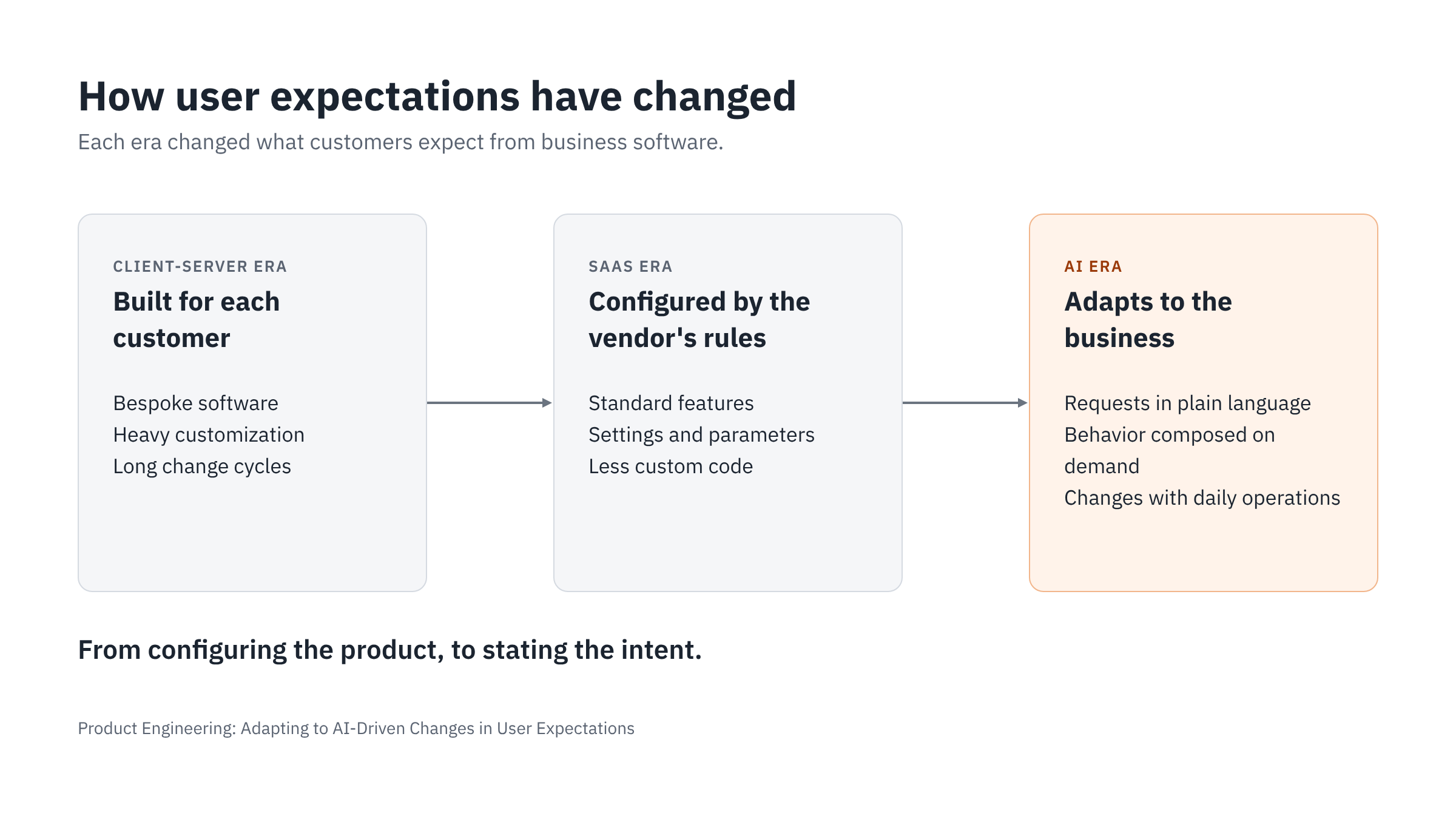
In the early client-server years, large enterprise products dominated. Many customers built their own software, or heavily customized existing products.
The SaaS era reduced heavy custom development. But it still relied mostly on configuration that the vendor defined. Customers could choose from options the vendor built. They could not easily change the underlying workflow, or combine behavior across modules.
Later, low-code workflow tools such as Salesforce Flow and Microsoft Power Automate allowed some combining across modules. But each new workflow needed a trained specialist to build and maintain it.
AI makes it much easier to express a new business need. Users no longer need to understand the product's configuration model to describe what they want. So customers now expect more than customization. They expect flexibility: the product's behavior should adapt to how they run their business each day. But the product can meet these requests only if engineers have built the right capabilities, data, rules, and orchestration. That is the subject of this article.
What this article covers
This article is for product engineers, product managers, and engineering leaders who build business software. We use an HR system as a running example, because most readers know how leave and attendance work. The same ideas apply to any enterprise product, such as payments, ERP, finance, or transaction-heavy B2B SaaS.
Each section starts with a user expectation, then explains the engineering response:
| What users expect | Engineering response | Section |
|---|---|---|
| "Understand what I mean" | Intent interpretation, context, and clarification | 1. User interface |
| "Handle my specific business process" | Composable capabilities and governed orchestration | 2. Workflows |
| "Understand my organization's data" | Semantic models and extensible schemas | 3. Data model |
| "Answer questions nobody planned for" | Governed analytics and defined metrics | 4. Analytics |
| "Tell me what needs attention" | Grounded advice and proactive monitoring | 5. Advice |
| "Keep working correctly as the product changes" | Evaluation, regression testing, and monitoring | 6. Engineering practice |
The JSON examples in this article are simplified to explain the ideas. They are not production designs.
1. User Interface: What Users Expect Now
What users expect: "Understand what I mean."
LLMs affect much more than the user interface. Their larger effect is on workflows, data, analytics, and product behavior, which later sections cover. This section covers only the interface.
Natural language interface
More and more users expect to set up complex, multi-step configuration with simple natural language. For example, an HR manager might type: "Set up a new leave policy for the Pune plant, the same as Chennai but with two extra casual leave days."
This is more than a new way to enter data. It brings two related expectations:
- Intent over precision. Users expect the system to fill in missing details and resolve unclear input. If the system is not sure, it should ask a question. It should not reject the input.
- Context carry-over and personalization. The system should remember earlier interactions. It should know the user's role and area of work. It should understand references such as "that one" or "same as last year" without the user repeating the details.
Generated, situational UI
For many questions, fixed dashboards now feel slow. Users expect the system to show the right chart, table, or form for the question they just asked. The screen is built for the task, not chosen from a fixed menu. Stable screens still matter. For daily, repeated work, a familiar fixed screen is often faster than a generated one. Good products offer both.
Natural language and structured UI together
Chat does not suit every task. It is poor for scanning long lists, comparing options, and making bulk edits. Users want to make the request in plain language and get a structured result: an editable table, a form, or a preview. They can then review and correct it before saving.
Explanation and control in the interface
Users want to see why the system made a choice. For example: "These 42 employees are included because they completed one year of service this month." They also want simple ways to change the result: edit a value, ask for another option, or switch to manual mode.
Proactive suggestions
Users expect the system to suggest the next step. After a leave policy is created, the system might ask: "Do you want to notify the employees in the Pune plant?" Users should not have to search for the next screen. Section 5 goes further: the product can notice issues before anyone asks.
Built-in help
Users expect help inside the product. They want to ask "How do I set up a probation period?" and get an answer, or have the system do it for them. Separate manuals and help pages feel slow.
2. From Parameterized Workflows to Flexible Orchestration
What users expect: "Handle my specific business process."
How products worked so far
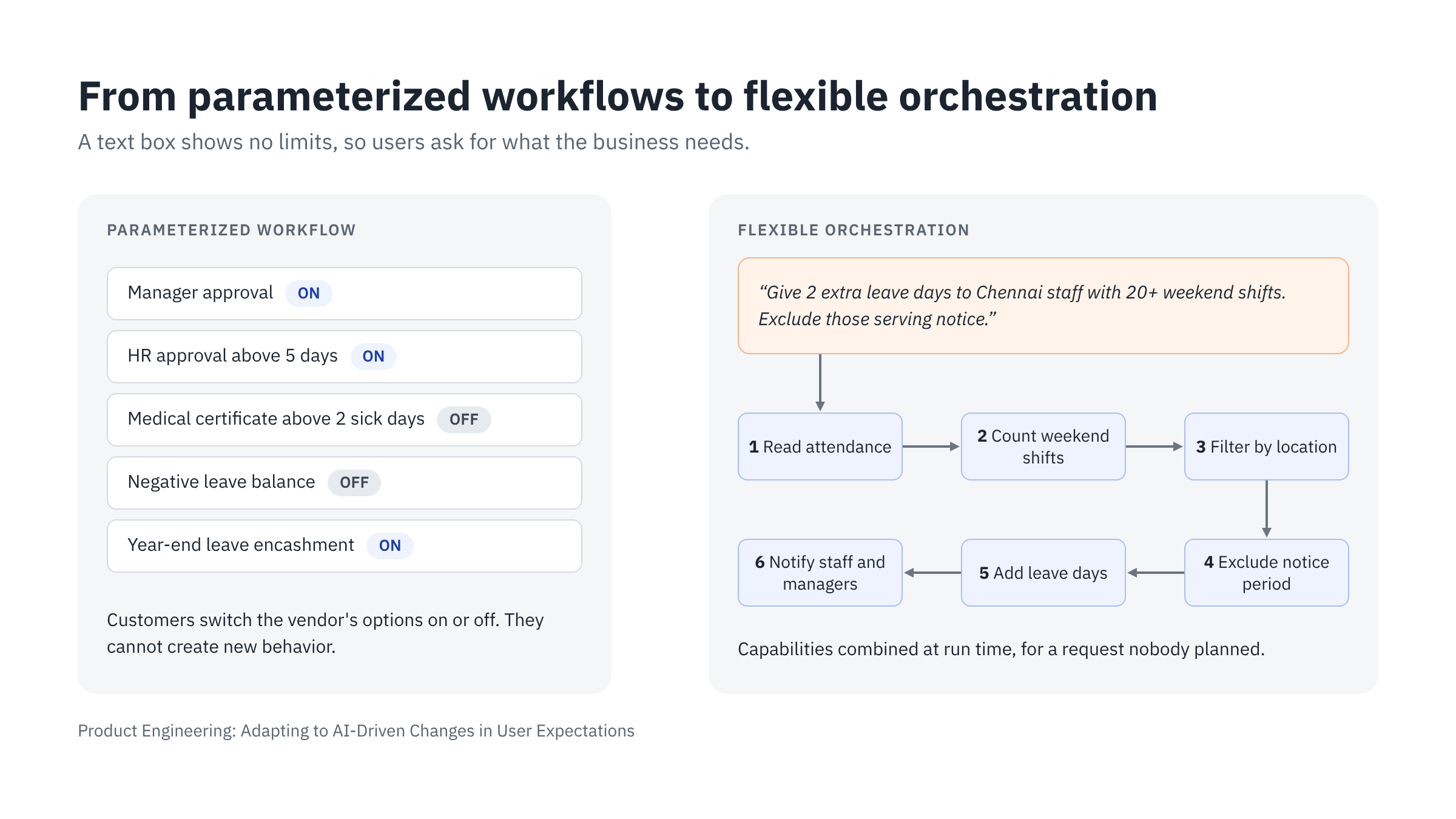
Most enterprise products offer parameterized workflows. The vendor defines the workflow and its steps. Customers change its behavior through parameters: settings, configuration flags, rule tables, and drop-down options.
Take the leave module in an HR system. A typical leave policy screen offers options like these:
- Leave types and days per year for each type
- Manager approval for every leave request (on or off)
- An extra HR approval for leave longer than 5 days
- A medical certificate for sick leave longer than 2 days
- Negative leave balance allowed (yes or no)
- Leave encashment at year end (on or off)
These options do change how the product behaves. A customer can add an approval step, add a check, or turn off a feature they do not use. But the vendor designed and built every option in advance. The customer can choose among those options. The customer cannot create new behavior, or combine functions across modules in a way the vendor did not plan. Anything else needs a change request, custom code, or a new release.
Why users accepted this
The UI showed the limits of the product. Users could see the available options. Missing options and disabled buttons told them what was not possible. So their expectations stayed within the product's limits.
What changes with LLMs
A natural language interface has no visible limits. A text box does not show what the system cannot do. So users ask for what their business needs, not for what the screen offers.
For example, an HR manager may ask:
"Give two extra days of earned leave this year to employees in the Chennai plant who worked more than 20 weekend shifts. Do not include employees who are serving their notice period."
No fixed leave policy screen supports this. The request combines several functions:
- Read attendance and shift records
- Count weekend shifts for each employee
- Filter by location (Chennai plant)
- Check employment status and exclude those serving notice
- Add two days to each eligible employee's leave balance
- Notify the employees and their managers
The user does not care that attendance, the employee master, and leave are in different modules. They expect the system to bring them together.
What products need to do
Build composable capabilities, not just parameterized workflows. Break the product into small, well-defined functions: get employees by filter, read attendance, update leave balance, send notification. Each function needs a clear input, a clear output, and clear business rules. Parameterized workflows still suit routine, high-volume processes. Capabilities let the product handle the requests those workflows do not cover.
Keep orchestration in the deterministic core. When we built Pivot Stack, we chose to keep orchestration out of the LLM, because every action that changes business data must pass through the same governed checkpoint. The LLM's job is to understand the request and turn it into a structured intent: which employees, which leave type, how many days. The product's own orchestration layer then decides which capabilities to call and in what order, and checks every rule. This is not an autonomous agent design. The LLM can ask to use approved tools, but every request goes through the product's tool registry, rules, permissions, and approval where needed. The LLM never calls anything directly, and never changes records itself. In Pivot Stack, the model is also used statelessly: it has no memory of the conversation and no access to business systems beyond what the product sends on each call. In Pivot Stack, we call this boundary between AI and business data the Governed AI Seam. Leave balances, payroll, and statutory calculations never depend on the model's output.
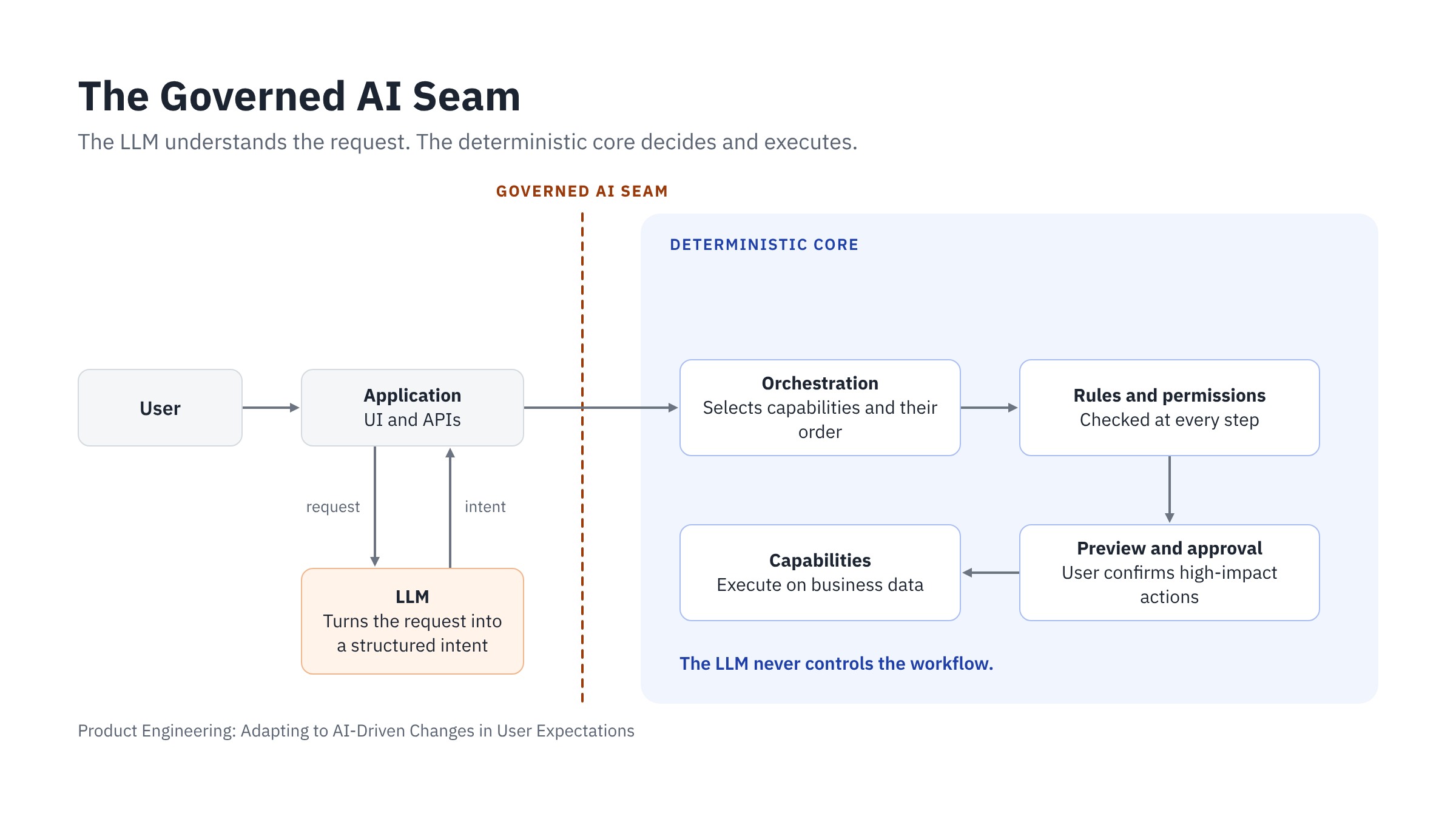
Deterministic does not mean fixed. How can a deterministic core run a combination that nobody planned? The plan is put together at run time, but every step is checked. For the Chennai request, the plan has six steps, built from six approved capabilities. Before anything runs, the core checks four things. Each capability must exist. The user must be allowed to use it. Its inputs must be valid. And the result must not break a business rule. Then it runs the steps in order and records each one. The core also checks key conditions again just before each step commits, because data can change after the plan is made. For example, an employee may resign between planning and execution. The steps can be new each time. The way they are checked and run stays the same.
Deterministic execution does not mean the outcome is always the same. Results still depend on current data, other transactions running at the same time, and external services. So each step needs validation, retries that never repeat work, and a way to recover from failure.
Make business rules explicit. With parameterized workflows, the screen itself enforced many rules. With orchestration, any combination is possible. So rules must live in the backend as clear constraints, such as "leave balance cannot exceed the carry-forward limit" or "any change that affects salary needs HR head approval." Every request must pass these checks before anything runs.
Enforce access control at every step. HR data is sensitive. A department manager should not see the salary or personal details of employees outside their team, even if they ask in plain language. Each function must check the user's permissions. The LLM layer must never bypass them.
Show a preview before execution. The system should show the plan in plain terms: which employees, how many days each, and who will be notified. The user approves it or changes it. Actions that affect pay or employment status should always need approval. More generally, each action should have a set level of autonomy: the system may suggest it, prepare it for review, run it after approval, or run it automatically within agreed limits. In Pivot Stack, we make this level configurable by customer, user role, workflow, monetary value, and risk. Our earlier Pivot Stack article explains these levels.
Decide when to proceed, ask, or escalate. Traditional systems work on validated inputs from forms. An LLM interprets language, and it can get the meaning wrong. So the product must decide what to do when it is not sure. If the intent is clear and the action is low-risk, it can proceed. If the request is unclear, it should ask. For example, "give extra leave to the night shift team" needs a question when there are two night shift teams. If the action is high-risk or outside policy, the system should send it to a person for approval, or reject it with a reason.
Plan for requests that cross systems. Some requests go beyond one product. Onboarding a new employee may involve HR, payroll, identity, IT equipment, and training systems. Capabilities then need secure integration contracts with those systems, and a plan for partial failure. For example, the employee record is created and payroll enrollment succeeds, but creating the login account fails. The product must record which steps are complete and which are still pending. It must not repeat the steps that succeeded. It then either retries the failed step safely, or passes it to a person to resolve. In Pivot Stack, long-running work like this runs as durable workflows. They remember where each task has reached, pick up again after a failure, and never carry out the same action twice.
Save useful plans as reusable workflows. When a plan works well, the user should be able to save it, name it, and run it again next year. Over time, each customer builds their own set of workflows without custom code.
Say clearly what is not possible. When a request is outside the product's capability, the system should say so directly and offer the closest option. It should not guess, or quietly produce a partial result.
Engineering impact
| Area | Parameterized workflow | Flexible orchestration |
|---|---|---|
| Design unit | Screen and workflow | Capability (function with contract) |
| Customization | Settings and config | Composition at run time, by the deterministic core |
| Role of the LLM | None | Understands intent; never controls the workflow |
| Rule enforcement | Mostly in UI and workflow | Explicit backend constraints |
| Access control | Mostly by screen and menu | Checked inside every function |
| Testing | Test each known path | Test each capability, each constraint, and overall behavior |
| Audit | Log user actions | Log request, intent, plan, approvals, and actions |
| Change requests | New release | Often a new composition, no code |
Every AI-assisted request should leave a traceable record: the original request, the interpreted intent, the plan, the rules and permissions checked, the approvals, the actions taken, and the outcome. Where the business process allows, the product should be able to reverse an action, or apply a correcting action when reversal is not possible. In Pivot Stack, we call this record the decision trace. It holds the evidence behind each action, not a transcript of the model's reasoning. Section 6 explains how testing must change.
What does not change
The core of the product still needs to be correct, reliable, and fast. Flexible orchestration depends on a solid core and a flexible data model. A smart LLM layer cannot make a weak core safe, and a rigid data model cannot support new combinations. Section 3 explains the data model.
3. The Data Model: The Foundation for Flexible Orchestration
What users expect: "Understand my organization's data."
Flexible orchestration cannot happen without a flexible data model. Orchestration combines capabilities in new ways, and every new combination reads and writes data in a new way. If the data model was designed only for fixed screens and known reports, orchestration will fail, however good the LLM is. The data model sets the limit on how flexible the product can be.
So the data model must be designed differently. In the past, teams designed it to store what the screens captured and to serve the reports the vendor planned. Now it must also support requests nobody planned, fields each customer adds, and an LLM that must understand what the data means.
This needs four kinds of flexibility. Each is a different engineering requirement, and they do not all come from one database:
- Semantic flexibility. The system understands business entities, relationships, fields, and what they mean. This comes from a structured description of the product.
- Schema extensibility. Customers can add supported custom fields and rules without a new release.
- Query flexibility. The system can answer questions that combine data from several modules and sources, including documents.
- Transactional integrity. Critical business records, such as leave balances and payroll, keep strict validation and consistency.
This does not mean storing everything as JSON, or using a schema-less database. A typical design uses a relational database for transactions, a metadata layer for custom fields, a document store, and a search index. The rest of this section has two parts. Part 1 covers the structured description that gives the LLM semantic understanding. Part 2 covers the data store that provides extensibility, query flexibility, and integrity.
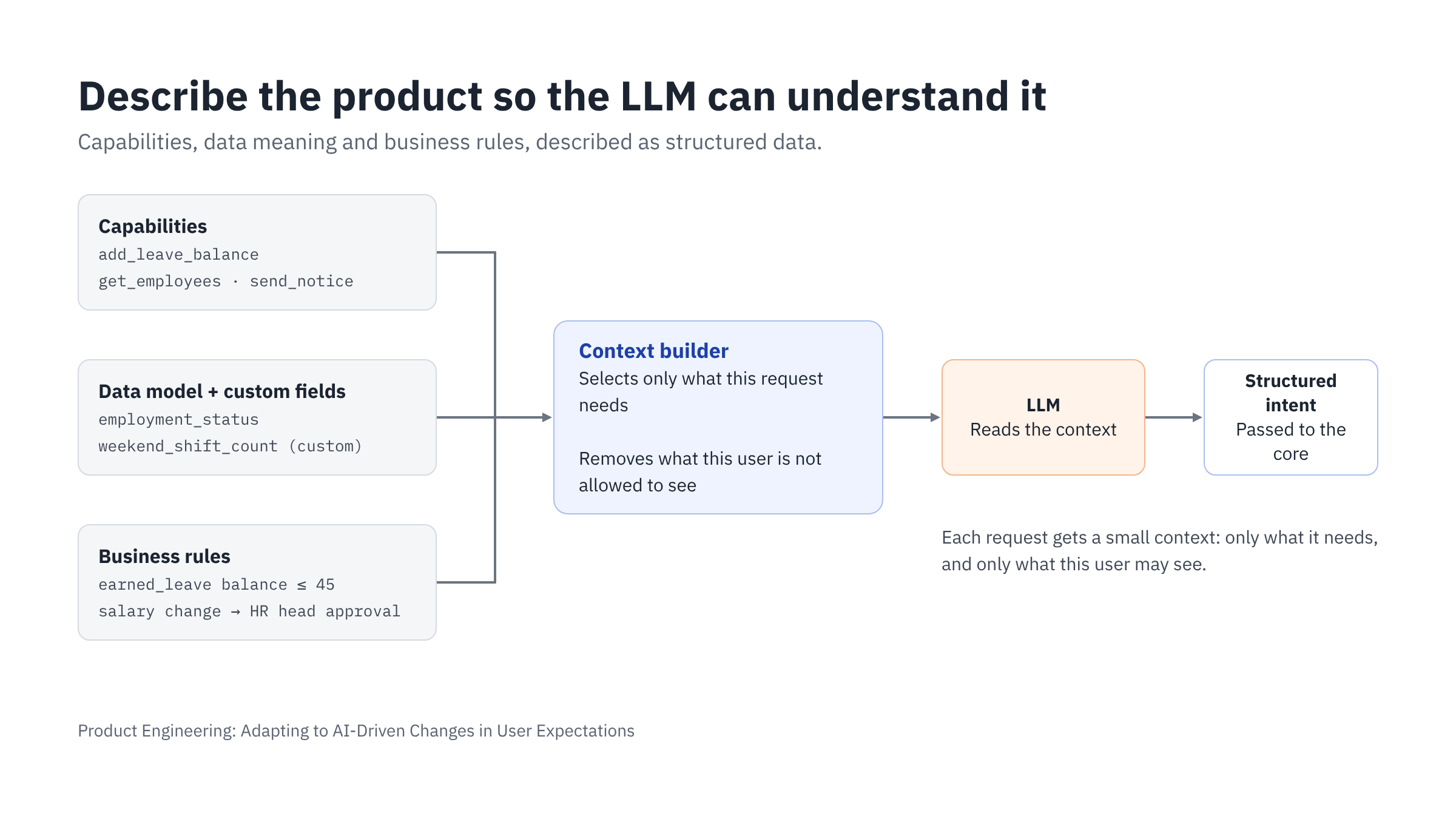
Part 1: Describe the product so the LLM can understand it
An LLM does not know your product. It does not know your modules, screens, or tables. It only knows what you give it with each request. This information is called context.
If the context is unclear, the LLM will guess. In an HR system, a wrong guess can lead to a wrong change in someone's leave balance or salary. So the product must describe itself clearly, in a structured format the LLM can read. JSON is the common format for this.
Three things need to be described:
- Capabilities: what the product can do
- Data definitions: what the data means
- Business rules: what is allowed
1. Capabilities described as JSON
Each function in the product needs a clear description: its name, purpose, inputs, outputs, and limits. The LLM uses these descriptions to understand what the product can do, and to turn a request into a correct structured intent. Standards such as the Model Context Protocol (MCP) use the same idea.
Example: a capability to add leave days.
{
  "name": "add_leave_balance",
  "description": "Add leave days to one or more employees for the current leave year. Half days (0.5) are allowed.",
  "inputs": {
    "employee_ids": { "type": "array", "items": { "type": "string" }, "required": true },
    "leave_type": { "type": "string", "enum": ["casual", "sick", "earned"], "required": true },
    "days": { "type": "number", "minimum": 0.5, "maximum": 10, "required": true },
    "reason": { "type": "string", "required": true }
  },
  "returns": { "type": "array", "description": "Each employee with old and new leave balance" },
  "permissions": ["hr_admin", "hr_manager"],
  "requires_approval": true
}
From this description, the LLM knows which inputs the request needs and what is not allowed. For example, it knows that 15 days is above the limit, and that a reason is required. The product's core still checks these limits before it runs anything.
2. Data definitions need meaning, not just structure
A database table tells the system the type of each field. It does not tell the LLM what the field means.
Consider a field named emp_stat_cd with values A, N, T. A developer learns the meaning from documentation. The LLM cannot. It needs the meaning written down:
{
  "entity": "Employee",
  "fields": {
    "employment_status": {
      "type": "string",
      "description": "Current employment status of the employee",
      "values": {
        "active": "Currently working",
        "notice_period": "Resigned or terminated, serving notice",
        "exited": "No longer with the company"
      }
    },
    "work_location": {
      "type": "reference",
      "refers_to": "Location",
      "description": "Plant or office where the employee works"
    }
  }
}
Now, when a user says "do not include employees serving notice," the LLM can map those words to employment_status = notice_period.
Good practice for data definitions:
- Use meaningful field names
- Write a short description for every entity and field
- List allowed values and explain each one
- State units clearly (days, hours, rupees)
- Describe relationships between entities (an employee belongs to a location, a location belongs to a region)
3. Business rules as data
In many products, business rules are hidden deep inside code. The LLM cannot read them, so it cannot explain them or respect them when it interprets a request.
When rules are stored as structured data, two things become possible. The system enforces them in code, and the LLM reads them to understand requests correctly and explain decisions to the user.
{
  "rule": "earned_leave_carry_forward_limit",
  "applies_to": "Employee",
  "condition": "leave_type = earned",
  "constraint": "balance <= 45",
  "message": "Earned leave balance cannot exceed 45 days."
}
If a request would break this rule, the system can tell the user why before anything runs.
Why the data model must be flexible
In the SaaS era, most customers used the same data model. With AI, customers expect the product to follow how their business works. They will regularly ask for new attributes and new rules. For example:
- A manufacturing customer adds "shift type" and "weekend shift count"
- A hospital adds "nursing license expiry date"
- An IT services company adds "current project" and "billable status"
If adding a field needs a database change and a new release, the product cannot keep up. The product needs a metadata-driven data model:
- Core entities (Employee, Location, Leave) stay fixed and well-tested
- Customers can add custom fields and entities through configuration
- Every custom field is registered with its type, description, and allowed values, the same as core fields
- The LLM context for each customer includes their custom fields automatically
When a customer adds "weekend shift count," the LLM can use it in requests the same day, because its meaning is already described.
Building the right context for each request
A large product may have hundreds of capabilities and thousands of fields. Sending all of them to the LLM with every request is slow and expensive, and it makes answers less accurate. The system should send only what is relevant:
- Capabilities related to the request (leave, attendance, employee)
- Data model of the entities involved, including the customer's custom fields
- Rules that apply
- Only what the current user is allowed to see and do
The last point is important. If a manager cannot see salary data, the salary fields should not appear in their context at all. In Pivot Stack, a context builder assembles this package for every call. It checks each piece of data against what the user may see. It also marks retrieved documents as information to use, not instructions to follow, which helps protect against instructions hidden inside documents.
Part 2: A data store built for flexible orchestration
The JSON description tells the LLM what the data means. The data store must hold that data and serve the requests that orchestration creates. A store designed for fixed screens is often not enough. With parameterized workflows, the vendor knew every query in advance and could tune the database for it. With orchestration, requests combine data in ways nobody planned.
The data store must support:
- Custom fields that can be queried, not just stored. Fields that customers add, such as "weekend shift count," must be filtered and sorted as quickly as core fields. Many teams keep core entities in relational tables and custom fields in an indexed JSON column, such as JSONB in PostgreSQL. Custom fields that are used often can move to their own indexed columns.
- Shared keys across modules. One request may join attendance, the employee master, and leave. Every module must use the same employee and location identifiers. Separate module databases with different IDs make orchestration slow and error-prone.
- Safe multi-step changes. One request may update leave balances for 120 employees. The store must apply the change as one transaction, or track each step so that a failure can be resumed or reversed. Each step needs an idempotency key, so a retry never adds leave twice.
- History of every change. HR data changes over time. The store should keep effective dates, so the system can answer "what was this employee's leave balance on 1 March?" It should also record each change and what caused it. This supports audit and explanation.
- Separate stores for transactions and analysis. Open-ended questions can create heavy queries. Running them on the transactional database can slow down everyday work. A read-optimized copy, such as a reporting replica or a data warehouse, can serve analytics, while live transactions stay on the main store. Section 4 explains which questions need live data.
- Access control in the data layer. Row-level and column-level security should be enforced by the store or the data access layer, not only by screens. Each customer's data must stay separate from every other customer's data.
- Schema changes without downtime. Customers add fields and rules regularly. The store must accept these changes while the product is running, with versions so that saved workflows keep working.
Structured and unstructured data, mapped together
HR data is not only rows in tables. Much useful information is unstructured: leave policy documents, exit interview notes, medical certificates, offer letters, and performance review comments. In section 5, the finding that exit interviews mention "workload" most often comes from this kind of data.
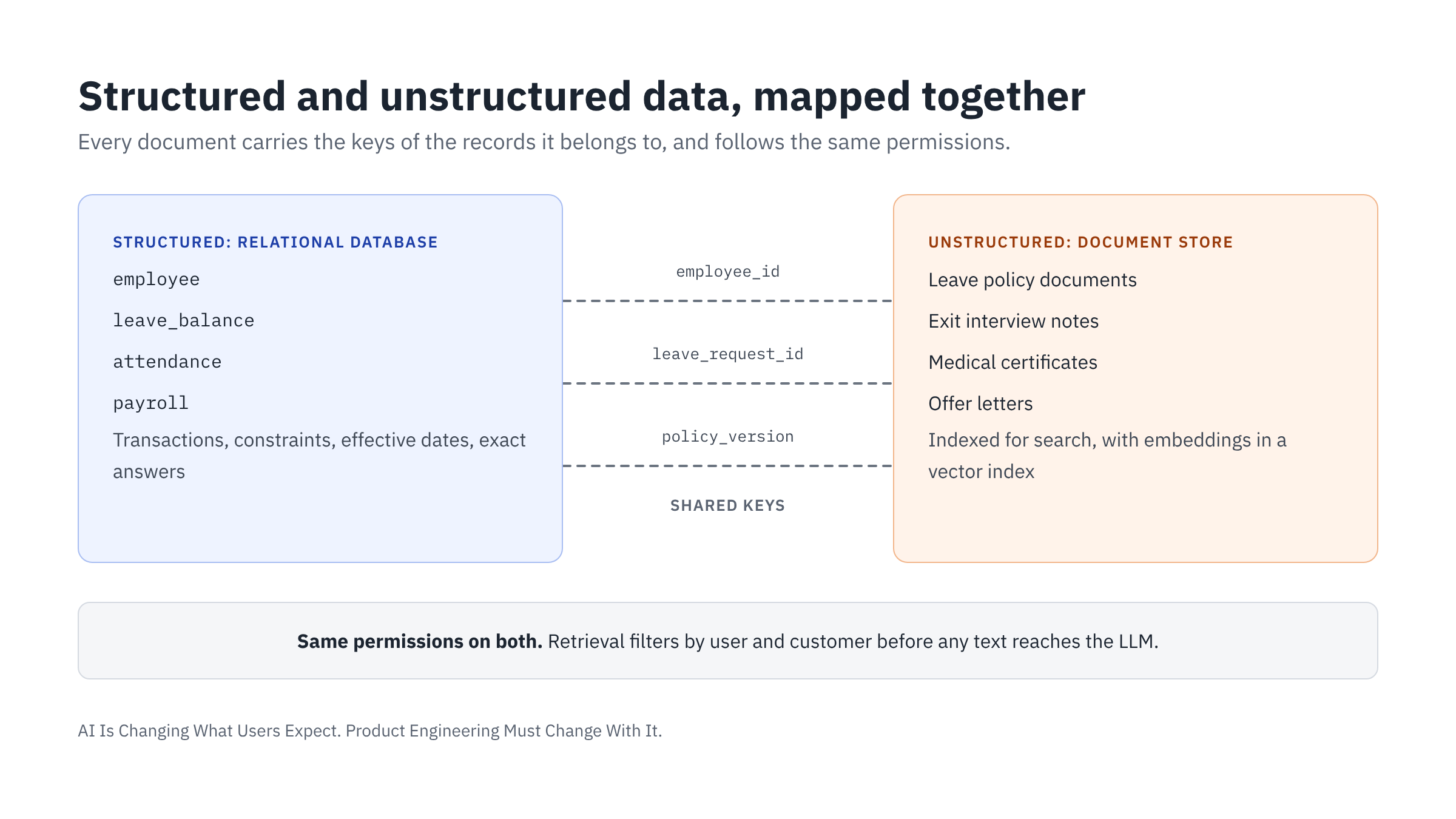
The store needs both kinds, and they must be linked to each other:
- Structured data in relational tables. Employees, leave balances, attendance, and payroll stay in a relational database. This data needs transactions, constraints, and exact answers.
- Unstructured data in a document store. Documents, notes, and attachments are kept in a document or object store. Their text is indexed for search, often with embeddings in a vector index, so the system can find the relevant passages for a request.
- A clear mapping between the two. Every document carries the keys of the records it belongs to: employee ID, location, leave request, or policy version. A medical certificate is linked to its leave request. An exit interview is linked to the employee and their exit record. Without this mapping, the system can find a document but cannot tell whose it is or which decision it supports.
- The same permissions on both. A document follows the access rules of the record it belongs to. If a manager cannot see an employee's medical details on a screen, they must not reach them through document search either. Retrieval must filter by permission and by customer before any text reaches the LLM.
- Metadata on every document. Each document needs its type, date, version, source, and sensitivity level. This lets the system pick the current policy instead of an old one, and leave out sensitive text that the request does not need.
With this mapping, the system can answer "Why is attrition high in Chennai?" It combines exact numbers from the database with the reasons people gave in exit interviews. And it still respects who is allowed to see what.
Risks of flexibility
Flexibility without control creates new problems:
- Duplicate or unclear fields. Two admins might create
weekend_shiftsandwknd_shift_count. The LLM will not know which one to use. Field names and descriptions need review. - Poor descriptions. A field described as "flag 2" is useless to the LLM. Check the quality of descriptions the same way you check the quality of code.
Engineering impact
| Area | Before | Now |
|---|---|---|
| Data model | Designed for storage and screens | Designed for storage, screens, and LLM understanding |
| Documentation | Separate, often outdated | Part of the schema, used at run time |
| Business rules | Inside code | Stored as data, enforced by code, readable by LLM |
| Custom fields | Limited, often hidden from logic | First-class, described, indexed, and usable in requests |
| Data store | Tuned for known screens and reports | Built for unplanned queries, safe multi-step changes, and full history |
| Unstructured data | Attachments stored, rarely used | Indexed, mapped to records, and permission-filtered for the LLM |
| Schema change | Release cycle | Configuration, with versioning and review |
What does not change
Transactional data still needs strong integrity. Leave balances, payroll, and attendance must stay consistent and correct. JSON metadata describes the data model and extends it. It does not replace a well-designed core database.
4. Data Analytics: Answering Questions Nobody Planned For
What users expect: "Answer questions nobody planned for."
How analytics worked so far
Most products offered analytics in three ways: fixed reports, fixed dashboards, and data export. If a user needed a new view, they raised a request. A BI team or a developer built a new report, which often took days or weeks. Many users exported data to Excel and did the analysis themselves.
What changes with LLMs
More and more users ask questions in plain language. For operational questions, they expect an answer in seconds, not a new report next week. The questions vary, and many are new. For example:
- "Which departments had the highest attrition in the last six months?"
- "Is attrition higher in teams with more overtime?"
- "How many employees in the Chennai plant worked more than 20 weekend shifts this year?"
No fixed set of reports can cover every question. So analytics must be flexible enough to answer questions that nobody planned for. But natural language does not remove every limit. Sometimes the data was never captured, a metric is not defined, the user lacks permission, or a query costs too much to run. In these cases, the system should say so clearly instead of guessing.
Two ways users need analytics
1. To make a decision. The user needs an answer and the data behind it, so they can judge it.
Example: "Should we hire five more people for the Chennai plant?"
The system cannot make this decision. It can bring the relevant data:
- Overtime hours per employee for the last six months, and the trend
- Attrition rate in the plant compared with other plants
- Number of open positions and average time to fill them
- Estimated monthly cost of five new hires
The system should show this data with clear sources and time periods. The decision stays with the user.
2. To complete a task. Here, analytics is one step inside a workflow. The result of a query becomes the input to an action.
In section 2, the HR manager asked for extra leave for employees with more than 20 weekend shifts. Before the system can add leave, it must count weekend shifts for each employee. This is an analytics query, and its result decides who gets leave.
These two uses have different needs:
| Decision support | Task completion | |
|---|---|---|
| Output | Summary, trend, chart | Exact list of records |
| Accuracy needed | Approximate trends may be enough | Must be exact |
| Data freshness | Recent data is usually fine | Must be current |
| Data source | Analytics store or data warehouse | Usually the live transactional system |
| Next step | User decides | System acts after approval |
What products need to do
Define metrics once, in a semantic layer. "Attrition rate" can be calculated in many ways. Does it count voluntary exits only, or all exits? Is it monthly or yearly? If the LLM writes its own formula each time, two users may get two different answers to the same question.
Define each metric once, in structured form, and let the LLM choose from these definitions:
{
  "metric": "attrition_rate",
  "description": "Percentage of employees who left during the period, out of average headcount. Average headcount is the average of month-end headcount for each month in the period.",
  "formula": "count(exits) / average_headcount * 100",
  "filters": { "exit_type": ["resigned", "terminated"] },
  "unit": "percent",
  "dimensions": ["department", "location", "grade", "month"]
}
Even "average headcount" needs a clear definition, as shown above. Without it, two teams can get two different numbers. This builds on section 3: the data model describes what the data means, and the semantic layer describes how to measure it.
Let the LLM produce a structured query, not raw SQL. The LLM should turn the question into a structured request:
{
  "metric": "attrition_rate",
  "group_by": ["department"],
  "filters": { "location": "Chennai" },
  "period": "last_6_months"
}
The system then converts this request into SQL using tested logic. This is safer than letting the LLM write SQL directly. Raw SQL from an LLM can use wrong joins, wrong definitions, or tables the user should not access.
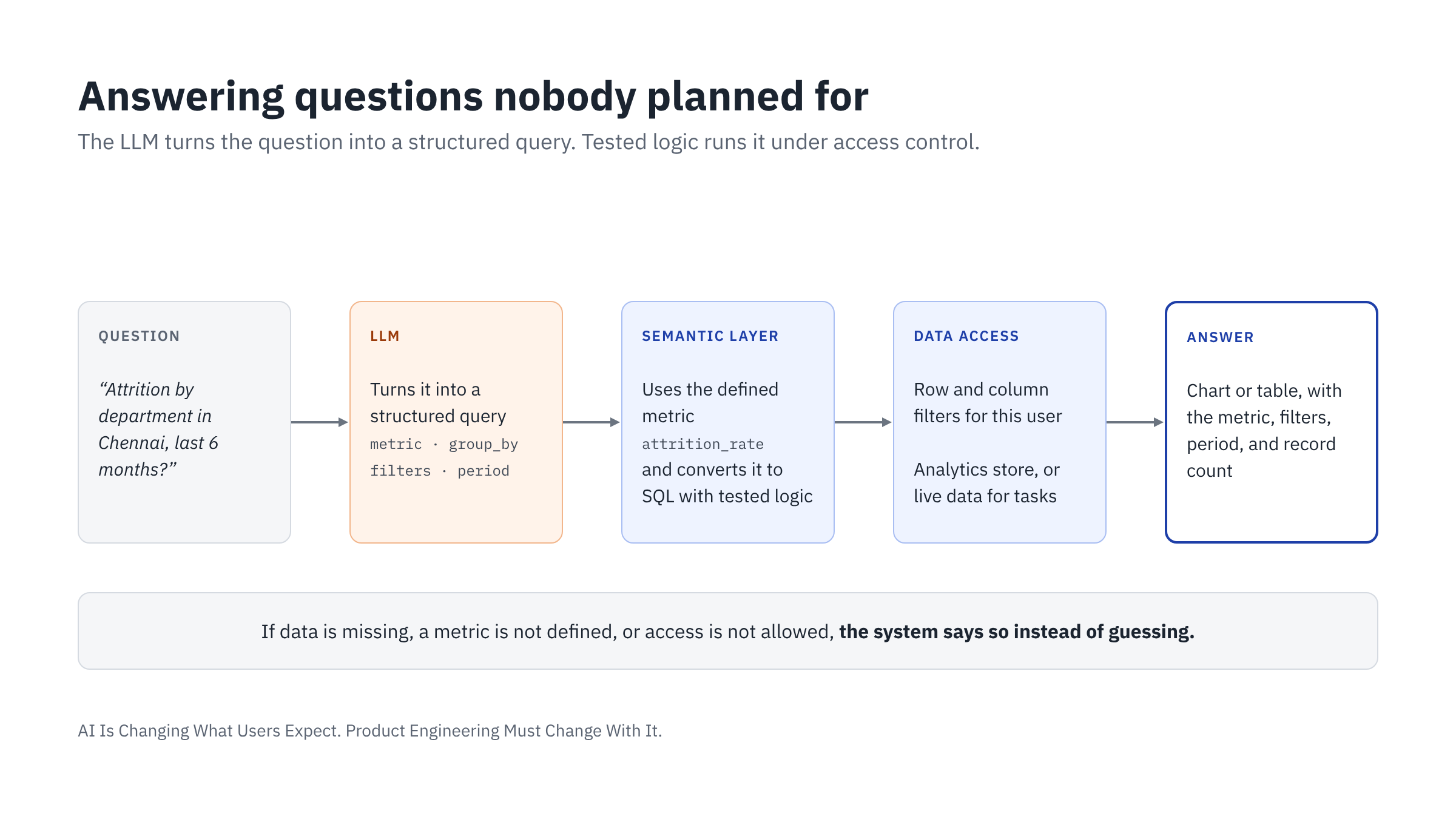
Apply access control to data, not just screens. A department manager may ask about attrition, but should see data only for their own department. The system must filter rows and hide restricted columns, such as salary, before any result reaches the LLM or the user. AI adds a new risk: it can combine data that a user is allowed to see into a result they should not see. A manager may be allowed to view individual employee records, but not to calculate pay differences by gender across the company. So permissions must cover what a user may derive from data, not only what they may read.
Show how the answer was calculated. Every answer should state the metric used, the filters applied, the time period, and the number of records. The user should be able to click through to the underlying records. This builds trust and helps the user catch mistakes.
State how current the data is. The system should say when the data was last updated, for example: "Data as of 6:00 AM today." For task completion, the system should read live data.
Ask, or state assumptions, when the question is unclear. If a user asks for "attrition," the system should ask whether they mean voluntary exits or all exits. Or it should use the standard definition and say so clearly in the answer.
Separate patterns from causes. AI makes it faster to explore data, but a fast answer is not always a complete analysis. If the user asks whether overtime causes attrition, the system should show the relevant data and say clearly what is an observed pattern. It should not claim a cause that the data does not prove.
Present results in the right form. As covered in section 1, answers should appear as a chart, table, or summary card, not as long text. Users can then sort, filter, or export.
Control performance and cost. Open-ended questions can trigger very heavy queries. The system needs pre-calculated summaries for common metrics, limits on query size, and timeouts.
Engineering impact
| Area | Before | Now |
|---|---|---|
| Reports | Built one by one on request | Answered on demand from defined metrics |
| Metric definitions | Spread across reports and code | Defined once in a semantic layer |
| Query creation | Written by developers | Structured request from LLM, converted by system |
| Data access | Controlled by report access | Row- and column-level control on every query |
| Output | Fixed report layout | Generated chart, table, or record list |
| Analytics and workflow | Separate | Query results feed directly into actions |
What does not change
Data quality still decides the quality of every answer. If attendance records are missing or wrong, the LLM will give wrong answers quickly and confidently. Flexible analytics makes bad data more visible. It does not fix it.
5. Combining Product Intelligence with Model Knowledge
What users expect: "Tell me what needs attention, and help me decide."
What the LLM brings beyond the product
A product knows its own data and its own functions. An LLM knows much more. It has general knowledge of business practices, common industry patterns, regulations, and how similar problems are usually handled.
In this article, product intelligence means the product's own data, analytics, and rules. Model knowledge means what the LLM learned from the large body of text it was trained on. When the two are combined, the product can do more than report numbers. It can help the user understand the numbers and decide what to do.
Example in an HR system
The HR manager asks: "Why is attrition high in the Chennai plant?"
The product's analytics (section 4) returns the facts:
- Attrition is 24% in Chennai, compared with 12% in other plants
- Most exits happen between 12 and 18 months of service
- Average overtime in Chennai is 30% higher than in other plants
- Exit interviews mention "workload" most often
A traditional product stops here. With an LLM, the product can add advice:
- Possible reasons worth checking: heavy workload and limited growth paths are common reasons for exits at 12 to 18 months of service.
- Common steps in similar situations include reviewing shift planning, setting overtime limits, or adding a skill-based pay step at 12 months.
- The system can draft a short overtime policy for review.
- The system can prepare a pulse survey for Chennai employees, to test these possible reasons.
The facts come from the product. The suggestions come from the LLM's general knowledge. They are hypotheses to investigate, not proven causes.
It helps to separate three sources of knowledge, because each needs a different level of trust:
| Knowledge source | Example | How to treat it |
|---|---|---|
| Company data | Attrition in Chennai is 24% | A fact, checked against company records |
| Verified external knowledge | Current labor regulations | Retrieved from approved, current sources |
| LLM general knowledge | Possible reasons for attrition | A suggestion or hypothesis, not an established fact |
The LLM's general knowledge cannot replace current regulations, industry benchmarks, or proven causes. It is useful for ideas, explanations, and drafts.
Other ways general knowledge helps
- Explaining results. "What does a 24% attrition rate mean for a manufacturing plant? Is it high?"
- Drafting content. Policy documents, employee letters, job descriptions, and announcements based on product data.
- Comparing with common practice. "Is our earned leave policy in line with what manufacturing companies in India usually offer?"
- Guiding setup. "We are opening a new plant in Hyderabad. What should we configure in the system?"
- Teaching the domain. New HR staff can ask what a term or process means while they work.
From reactive to proactive
So far, the HR manager had to ask the question. Traditional software is reactive: users open it to do a task or look something up. With AI, the product can also notice what needs attention and say so first.
For example, the product could notice that attrition in the Chennai plant has risen for three months in a row. It could alert the HR manager with the evidence and possible reasons, before anyone asks for an analysis.
Users will value this only if it is done carefully. A product that interrupts people too often is soon ignored. Proactive features need:
- Clear triggers. Each alert is based on a defined metric and a threshold that the customer sets, such as attrition above a chosen level for three months. Alerts should not be based on the LLM's guesses.
- Event-driven monitoring. The product watches business events and metrics as they change, instead of waiting for someone to run a report.
- The right person, with the right permissions. An alert goes only to people who are responsible for that area and allowed to see that data.
- Limits on interruptions. Rules for priority and frequency, so users see what matters and are not overwhelmed.
- Evidence and next steps. Each alert shows the data behind it and suggests actions, which the user can accept, change, or dismiss.
- Learning from responses. If users keep dismissing a type of alert, the product should adjust it or stop sending it.
Proactive does not mean autonomous. The product points out what needs attention and prepares options. The user still decides, and every action still goes through the product's capabilities.
Advise broadly, act narrowly
The key design rule: the LLM can give advice using its general knowledge, but every action goes through the product's capabilities.
| Layer | Source | What it is used for |
|---|---|---|
| Facts | Product data and analytics | What is true in this company |
| Advice | LLM general knowledge, using product facts | What it means and what could be done |
| Actions | Product capabilities only | What the system actually changes |
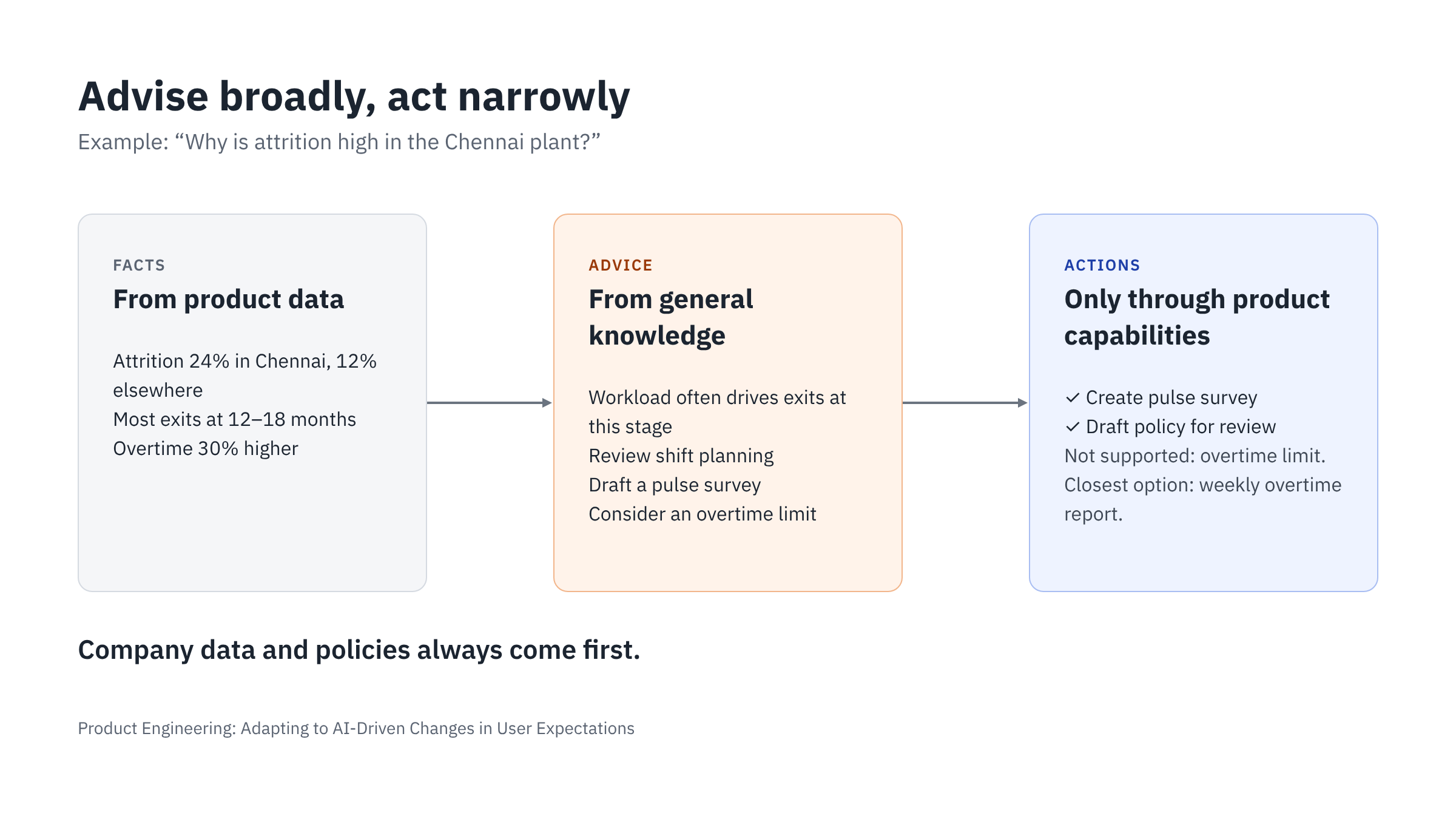
If the LLM suggests "set an overtime limit," the system can apply it only if the product has a capability for overtime limits. If not, the system should say so clearly. For example: "This system does not support overtime limits. You can track overtime with the weekly overtime report instead."
The LLM must never pretend the product can do something it cannot.
Keeping the LLM within the product's scope
The context the product builds (section 3) controls the LLM's behavior. The context should set clear limits:
{
  "assistant_scope": {
    "domain": "Human resources for this company",
    "allowed": [
      "Answer questions using company HR data the user can access",
      "Explain HR concepts and common practices",
      "Suggest actions and draft HR documents",
      "Propose actions only through listed capabilities"
    ],
    "not_allowed": [
      "Topics unrelated to HR and this product",
      "Actions outside listed capabilities",
      "Final legal or statutory decisions"
    ],
    "priority": "Company policy and data override general knowledge"
  }
}
Four rules make this work:
- Actions map only to product capabilities. The LLM may suggest an action, but only a product capability can change data.
- Advice stays in the product's domain. An HR system should help with HR. It should not write marketing emails or answer general questions unrelated to the business.
- Company data and policies come first. If the company policy allows 18 days of earned leave, the LLM must use 18. It must not use a "typical" number from general knowledge.
- Advice is labeled as advice. The user must see what is a fact from their data and what is a suggestion. For example: "Based on your data…" and "A common approach is…".
Risks to manage
- Outdated or wrong general knowledge. Labor laws and statutory rules change, and they differ by state. The LLM's knowledge may be old or incomplete. For statutory, payroll, tax, and labor law matters, the system must separate general information from compliance guidance for a specific state or country. If the product does not have verified, current regulatory content, it should direct the user to an approved source or a qualified expert.
- Advice that looks like fact. If suggestions and data look the same on screen, users may trust advice too much. Keep them visually separate.
- Users trusting advice without thinking. The system should present options with reasons, not one answer to follow blindly. The user makes the decision.
- Bias in advice about people. In HR, advice can affect hiring, promotions, and pay. The LLM's general knowledge may carry bias from the data it learned from. Advice about individual employees should use only relevant, job-related facts, and a person must always make the final decision.
- Suggesting actions the product cannot perform. This frustrates users. The system should state what it can do and offer the closest supported option.
Engineering impact
| Area | Before | Now |
|---|---|---|
| Product value | Store data, run workflows, show reports | Also interpret data and advise |
| Initiative | User asks, product answers | Product also points out what needs attention, within set limits |
| Domain knowledge | Built into screens and help pages | Also comes from the LLM, within set limits |
| Scope control | Defined by screens and menus | Defined by context, capabilities, and instructions |
| Output | Facts and reports | Facts, labeled advice, alerts, and drafts |
| Content creation | Manual, outside the product | Drafted inside the product from real data |
6. Engineering for Behavior, Not Just Functionality
What users expect: "Keep working correctly as the product changes."
The first five sections describe what the product must do. This section describes how the way we build it must change.
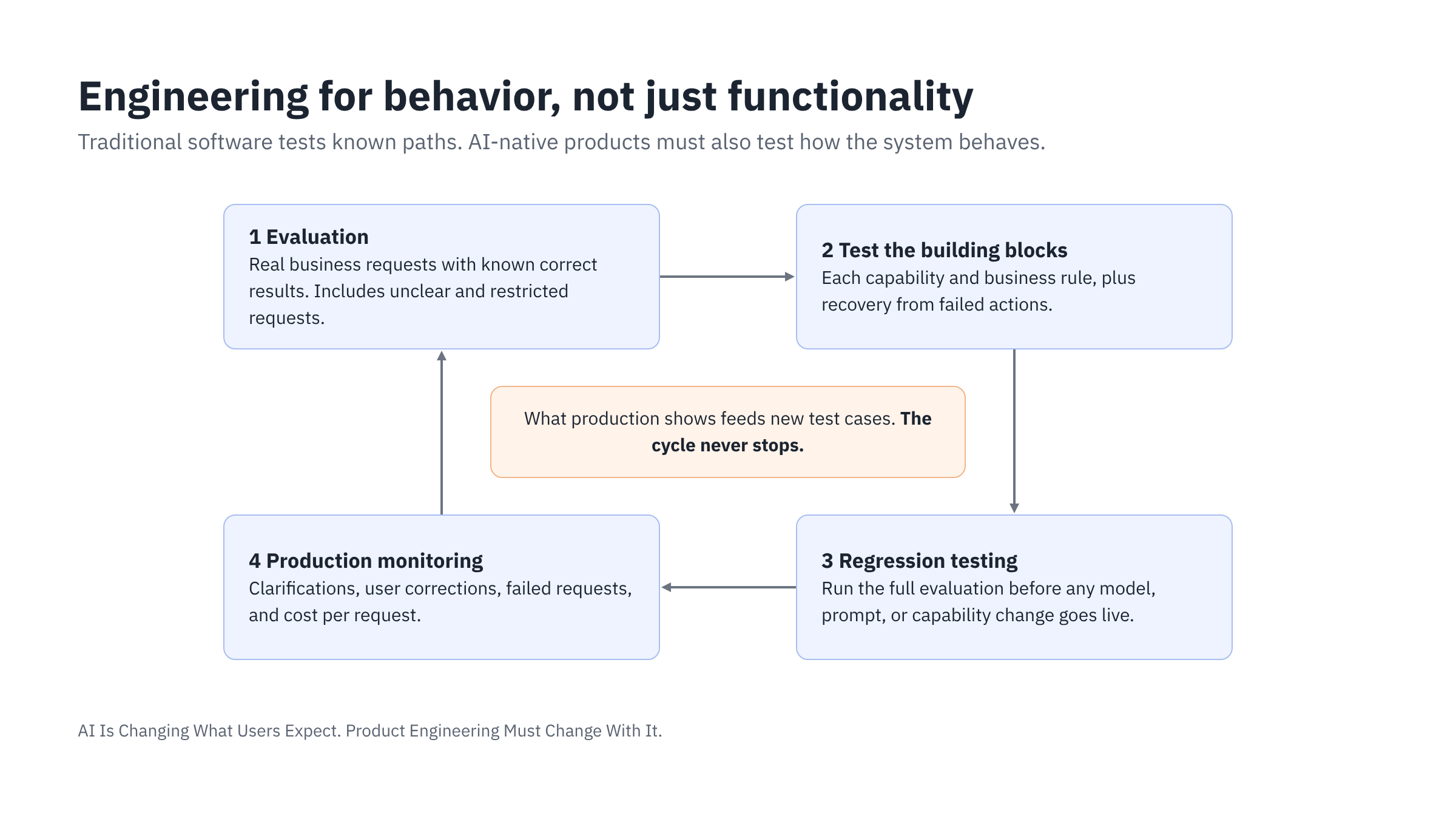
In traditional software, engineers test predefined operations. Each screen and workflow has known inputs and expected outputs, and a test checks each known path. With AI, users create new paths every day. The same request can be phrased in many ways, and a model update can change behavior without any code change. So teams must test behavior, not only functions.
This changes four practices:
- Evaluation. Build a set of real business requests with known correct results. Measure how often the LLM interprets the intent correctly, whether the resulting plan is valid, and how the system handles unclear requests. Include requests that try to reach restricted data, to confirm that permissions hold in every case.
- Testing the building blocks. Test each capability and each business rule well, including whether the constraints reject unsafe combinations. Track how many business rules are covered by validation tests. Test that failed actions recover correctly, without duplicate changes.
- Regression testing for AI changes. Version models, prompts, and capability descriptions in the same way as application code. Run the full evaluation again before any of them changes in production. In Pivot Stack, we version models, prompts, retrieval settings, and evaluation datasets this way. We can see which version produced a result, and roll back when quality or cost gets worse.
- Production monitoring. Track how often the system asks for clarification, how often users correct or reject its plans, which requests fail, and what each request costs. These signals show problems early, before users lose trust.
Engineers no longer only build features. They build and govern a system that interprets a wide range of user requests, and they must show that it does so safely.
Conclusion
User expectations have changed many times. In the client-server era, customers wanted software built for their business. In the SaaS era, they mostly configured standard features that the vendor defined. With AI, more and more of them expect the product to follow how their business works, and to change as their business changes.
This is not only a change to the user interface. It changes how products are designed and built:
- User interface. Users say what they want in plain language, and the result appears in the right form.
- Workflows. Composable capabilities extend parameterized workflows. The deterministic core checks and runs every step.
- Data model. Semantic flexibility, schema extensibility, query flexibility, and transactional integrity make orchestration possible.
- Data analytics. Defined metrics answer new questions, with the evidence behind each answer.
- Advice. The product advises broadly and points out what needs attention, but acts only through its capabilities.
- Engineering practice. Teams test and monitor the product's behavior, not only its functions.
The principle from my book, The Pivot Model, still applies: understand the end user and deliver the value they expect. What has changed is the expectation itself. The enterprise products that adapt well will not be the ones with the best chat interface. They will be the ones whose capabilities, data, rules, permissions, and approval paths are clear enough for AI to understand, and controlled enough for the business to trust. These are the principles we built Pivot Stack on.
AI makes flexibility possible. Product engineering makes it safe.